
Maksim Liakh
I'm seo engineer with extensive web development experience, I promote both personal and client projects. I have more than 8 years of experience working with web projects
Google Search Console Now Tracks Social Media and Video Platform Content Performance
 08.07.2026 10:13
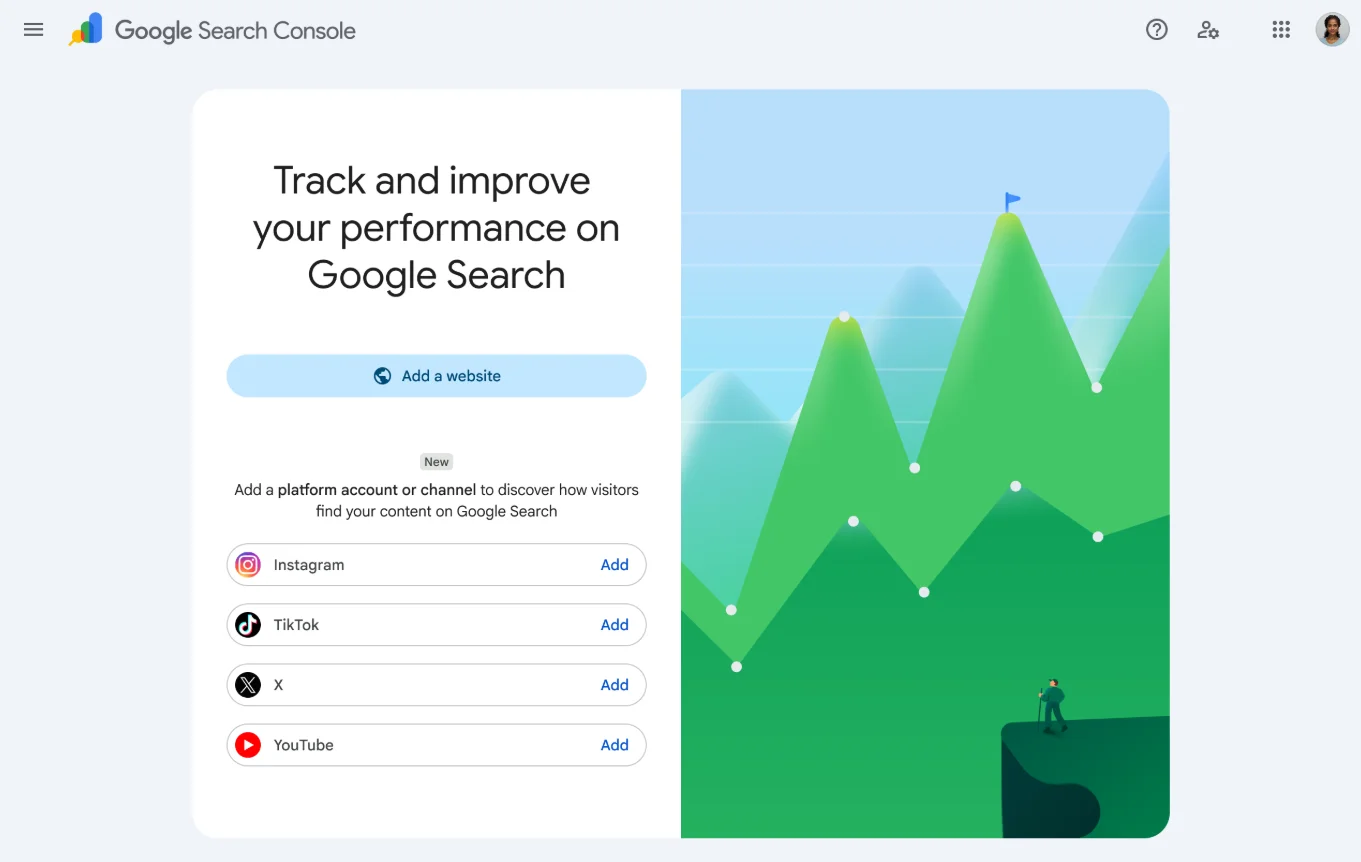
Google introduced a new property type in Search Console — Platform Properties. This feature allows authors, creators, and brands to track how their posts from Instagram TikTok X (Twitter) YouTube appear in Google Search and Discover.
Key change: previously, Google Search Console only worked with websites — you had to verify ownership of a domain or URL prefix. Platform Properties break this rule: now you can connect a social account you don't own as a developer and get search analytics for it. This is fundamentally new territory for the tool.
Available Reports
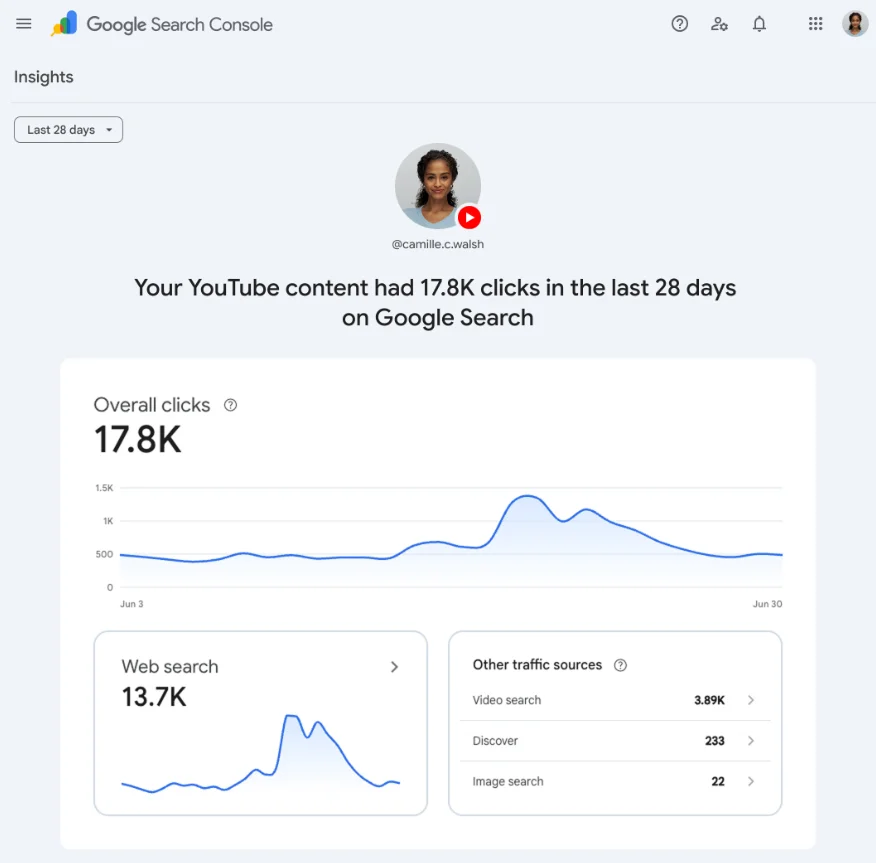
After connecting an account, three reports become available:
1. Performance
Shows total clicks, impressions, CTR, and average position. You can filter data by specific posts and search queries that drive traffic from Search, Discover, and Google News. Data can be exported for further analysis.
2. Insights
Provides a high-level overview of traffic trends, top-performing posts, and how users find your account through Google.
3. Achievements
Tracks growth milestones — for example, crossing a new click threshold from Search over a given period. By default, data is displayed for the last 28 days.
Important limitation: Platform Properties measure performance only in Google Search. They do not count views within the apps themselves. For example, the number of video plays on TikTok will not appear in the reports. Google counts an Instagram story that appears in search results as an impression, and a tap on it as a click.
How to Set Up Platform Properties
- Open the Search Console welcome screen or the property selector dropdown in the sidebar.
- Click "Add property".
- Select one of the four supported platforms: Instagram, TikTok, X, or YouTube.
- Follow the instructions to verify ownership of the account.
- After verification, click "Go to property".
Google recommends adding each account or channel as a separate property to track them individually. Ownership is re-checked periodically — if the connection lapses, it can be re-verified without losing historical data.
The feature is rolling out gradually over the coming weeks, so it may not be available in your account yet.
Why This Is Useful
1. Unified Analytics Window for Multi-Platform Creators
Previously, to understand how content from TikTok or Instagram reached Google, you had to collect data manually or rely on each platform's internal analytics. Now everything is gathered in one place — alongside your website data, if you have one.
2. Understanding Search Demand
You can see which search queries drive people to a specific TikTok video or Instagram post. This allows you to optimize titles, captions, and content plans based on real audience interest.
3. Works Without Your Own Website
Google positions this feature for creators who don't have a website at all. A homepage is no longer a mandatory entry point — audiences increasingly find authors through short videos and social feeds.
4. Connection with Search Profiles
In June 2026, Google launched Search Profiles — public creator pages that aggregate content from all platforms in one place in Search and Discover. Platform Properties are the analytics backbone behind these public profiles.
5. Complement to AI Reports
Google previously added performance reports for AI interfaces. The new feature extends Search Console beyond website owners to social and video creators.
Use Cases
📱 Example 1: Food Blogger on TikTok
A blogger posts recipes on TikTok and wants to understand which dishes people search for on Google. Through Platform Properties, they see that the query "tiramisu recipe in 5 minutes" brings more clicks than "complex desserts". Based on this, they adjust their content plan toward quick recipes and optimize video descriptions.
🛍️ Example 2: SMM Agency for a Fashion Retailer Brand
An agency manages Instagram, TikTok, and YouTube for a brand simultaneously. In Search Console, they collect data across all three platforms and compare which format (Reels, Shorts, Stories) is better indexed by Google and drives more organic traffic from Search.
📝 Example 3: Independent Journalist on X (Twitter)
A journalist publishes analytical threads on X and doesn't have their own website. Through Platform Properties, they track which topics (e.g., "China economy 2026") generate the most interest in Google Search, and use this information to plan future publications.
🎓 Example 4: YouTube Educational Content Creator
The creator sees in the Insights report that their video about "Python basics" gains traffic not only from video search but also from regular web search. They add timestamp markup and links to related videos in the description to increase audience retention.
✨ Example 5: Micro-Influencer Without a Website
A creator manages only Instagram and TikTok. Previously, they had no access to search analytics at all. Now they can see which queries Google uses to find their profile, and negotiate with brands based on real data about organic reach.
Differences from Similar Features
| Feature | What It Does |
|---|---|
| Platform Properties | Analytics: shows how posts from social networks perform in Google Search |
| Search Profiles | Public creator page in Google that aggregates content from all platforms |
| December 2025 Experiment | Predecessor — first tests of connecting social channels to Search Console |
Conclusion
Platform Properties represent Google's step toward making Search Console a universal analytics dashboard for everyone who creates content online, not just website owners. For creators, marketers, and brands, this means the ability to track organic reach through Google without needing to own a website — and make decisions based on data, not guesswork.
📚 Sources and Documentation Links
- 📖 Google Search Console Help — Platform Properties (Official Google Documentation)
- 🗞️ The Keyword — Google Search Console Shows How Social Posts Perform in Search
- 🔧 Google Search Central Blog — Search Console Social & Video Platforms (July 2026)
- 📰 How2Shout — Google Search Console Can Now Track Your Social Performance